
NOTE: This is a different process than our typical restart. Please consult with our Support Team for which procedure you should follow.
To perform a One-Hour Reset of your SOTER RS, please follow this procedure:
-
Turn OFF the SOTER RS – your key must be inserted
-
Ensure the key is inserted and in the ON position.
-
Press the POWER button to turn the system OFF.
-
After the system has completely shut down, turn the key counter-clockwise to the OFF position.


-
-
Unplug the power cord from the electrical outlet completely.
-
WAIT ONE HOUR before proceeding. This is a very important step to ensure that all backup power has drained from the system.
 Please ensure ONE FULL HOUR has passed before proceeding to Step 4.
 -
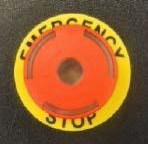
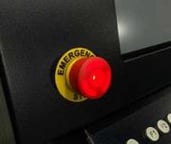
Reset both E-Stop Buttons
-
One button is located on the Operator Console. The other is located on the Delta Frame.
-
Push each button down and turn clockwise until it pops out, then release.
-
-
Reset the Platform
-
Move the platform by hand all the way to the left, then all the way to the right, then to the center of the platform.
-
-
Power the SOTER RS back ON – your key must be inserted
-
-
Turn your key clockwise to the ON position.
-
Press the ON/OFF button.
-
If desired, or if it is part of your agency protocols, you may turn the key counter-clockwise and remove it once the restart is complete.