
- Turn OFF the SOTER RS – your key must be inserted
- Ensure the key is inserted and in the ON position.
- Press the POWER button to turn the system OFF.
- Turn the key counter-clockwise to the OFF position.


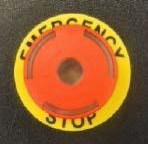
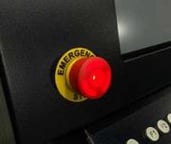
- Reset both E-Stop Buttons
- One button is located on the Operator Console. The other is located on the Delta Frame.
- Push each button down and turn clockwise until it pops out, then release.
- Reset the Platform
- Move the platform by hand all the way to the left, then all the way to the right, then to the center of the platform.
- Power the SOTER RS back ON – your key must be inserted\
- Turn your key to the RIGHT (ON) position.
- Press the ON/OFF button
- If desired, or if it is part of your agency protocols, you may turn the key to the left and remove it, once the restart is complete.
After restart, the system will proceed through its usual startup and calibration sequence.
NOTE: If you have experienced a power outage or other issue that is not resolved with a Restart, refer to the ONE-HOUR RESET procedure.